

LDAP authentication takes three forms:
- No authentication: Read access granted to all. The Stooges and Delta house examples in the YoLinux LDAP Tutorial are of this form.
- Basic authentication: Client must bind with a DN and password. (Described in this tutorial)
- Secure authentication: Secure encrypted or authenticated connection.
In this example a bind user is created for read access. This adds simple password protection with a common login/password for all users. (It is simple and does not require the generation of passwords for all users as in the second example.) This method protects the LDAP database from spammers and is a simple front line defense.
File: /etc/openldap/slapd.conf
.
..
...
database        ldbm
suffix          "o=delta"
suffix          "dc=ldap,dc=delta,dc=org"
rootdn          "cn=DeanWormer,o=delta"
rootpw          secret2
defaultaccess   none                         - Deny anonymous viewing and access
access to attr=userPassword                  - Deny anonymous viewing of passwords
       by dn="cn=DeanWormer,o=delta" write   - LDAP root not denied
       by self write                         - Allow user to update his password
       by * auth                             - Allow access to bind to LDAP (i.e. login requires access to password but still not allowed to view it)
access to *
       by dn="cn=DeanWormer,o=delta"  write  - LDAP root has full access
       by dn="cn=fratbrother,o=delta" read   - Required for first example. Allow this user to read the database. (Except passwords which are denied above)
       by users read                         - Required in second example where user logs in with his own password to read LDAP database. Reading of passwords other than his own is denied.
       by self write
       by * auth
directory       /var/lib/ldap/fraternity
schemacheck     on
lastmod         on
...
..
.
Notes:
- The order of granted access is from most specific to most general. (Required) The "access to attr=userPassword" is more specific than the "access to *" rule and thus comes first.
- LDAP passes one rule at a time in the order given until it fails. Order your rules appropriately.
- Giving write also gives read, which gives search, which gives compare.
- Every access to directive ends with an implicit by * none clause.
- Every access list ends with an implicit access to * by * none directive.
- Access directives modify the defaultaccess control.
- [Potential Pitfall]: OpenLDAP 2.4 update - RootDN default privilages do not have to be specified, in fact it is an error.
/etc/openldap/slapd.conf: line 48: rootdn is always granted unlimited privileges.You will get this error when running: slaptest -f /etc/openldap/slapd.conf -F /etc/openldap/slapd.d
Specify the following instead:access to * by self write by * auth by * noneomit the line: by dn="cn=DeanWormer,o=delta" write as the error states: "rootdn is always granted unlimited privileges".
| access to | what | by | who | type-of-access | ||||||||||||
|---|---|---|---|---|---|---|---|---|---|---|---|---|---|---|---|---|
| access to | * ("dn=.*" All)
dn=".*,o=organization" filter="sn=Ander*" attr=attribute attr=attribute1,attribute2 attrs=attribute1,attribute2 When using more than one of these rules, separate by space. |
by | * (All, anonymous and authenticated users)
anonymous (Anonymous non-authenticated users) users (Authenticated users) self (User associated with target entry) dn= (Users matching regular expression) dnattr= (DN Attribute) addr="192.168.100.200" (addr tricks) group [/objectclass[/attrname][.basic style]]=regex ] peername [.basic style]=regex]
sockname [.basic style]=regex]
|
|
File: fratbrother.ldif
dn: cn=fratbrother,o=delta
cn: fratbrother
sn: fratbrother
objectclass: top
objectclass: person
userPassword: fratsecret
OR use encryption: (much better!)
dn: cn=fratbrother,o=delta
cn: fratbrother
sn: fratbrother
objectclass: top
objectclass: person
userPassword: {CRYPT}frzelFSD.VhkI
Password created with the command:
  []$  perl -e 'print("userPassword: {CRYPT}".crypt("fratsecret","frat-salt")."\n");'
  userPassword: {CRYPT}frzelFSD.VhkI
Add to LDAP:
ldapadd -f fratbrother.ldif -cxv -D "cn=DeanWormer,o=delta" -w secret2
LDAP Bind:
- Bind with the "User ID" or "bind DN": cn=fratbrother,o=delta
- Password: fratsecret
Discussion: This will password protect your LDAP database. It creates a user ID "fratbrother" which can be used by all to have read only access to the LDAP directory. One must bind with the user login: fratbrother and password: fratsecret to access the database. The LDAP root login "DeanWormer" and password retain write privileges. This keeps spammers/hackers from viewing the whole database with a tool like GQ. The drawback is that everyone uses the same login/password but it is simple to configure. Read access is granted specifically to "fratbrother" in the slapd.conf file.
Netscape Address Book: When binding using Netscape Messenger use the "User ID:" fratbrother and "Password:" fratsecret. This is different than the LDAP Bind described above. I am assuming that Netscape employs the "Server Root" to generate the LDAP DN. The dialog box asks you to enter your Email address. This is because the Netscape Messenger LDAP DN uses the email address. This message can be ignored.
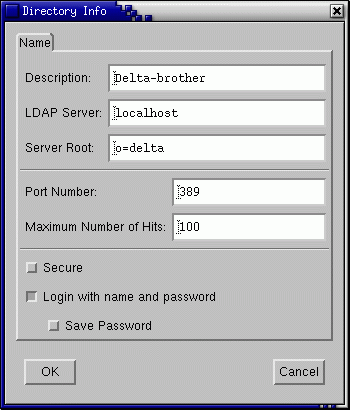
Netscape Directory Info
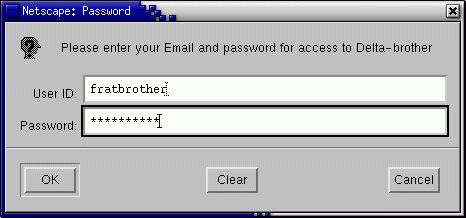
Netscape LDAP Password
[Potential Pitfall]: Some versions of Netscape will attempt to bind using the "User ID" and "Password" of NULL even if you enter values for these fields. This discovery was made using the Ethereal packet sniffer to diagnose problems I was having. I was using Netscape 4.77. (Red Hat Bugzilla: BUG# 55604)
This method of LDAP database protection is a little more sophisticated because it requires a password (LDAP attribute: userPassword) for each user. Read access is granted to the users in the slapd.conf file by the statement "by users read". The "by users read" is suited for an LDAP address directory which would be accessed by email clients. It gives the user access to query and download the appropriate email data to their address books. It might not be appropriate for a pure authentication server because it allows one to see all the users of the system possibly exposing too much private data. One has to evaluate their own security needs.
Use the same /etc/openldap/slapd.conf as the above example
File: hoover.ldif
dn: cn=Hoover Anderson,ou=1960,o=delta
cn: Hoover Anderson
objectClass: top
objectClass: person
objectClass: organizationalPerson
objectClass: inetOrgPerson
mail: HAnderson@isp.com
givenname: Hoover
sn: Anderson
ou: 1960
uid: 1960
street: 14 Cherry St.
l: Austin
st: TX
postalcode: 76888
pager: 800-555-1319
homePhone: 800-555-1313
mobile: 800-555-1318
userPassword: hooversecret
Add to LDAP:
ldapadd -f hoover.ldif -cxv -D "cn=DeanWormer,o=delta" -w secret2
Alternate method of adding a password to a user: (or include it in LDIF as above. Do one not both.)
ldappasswd -xv -D "cn=DeanWormer,o=delta" -w secret2 -S "cn=Hoover Anderson,ou=1960,o=delta"
Command line arguments:
- x: Use simple authentication
- v: Verbose (More descriptive output)
- D: The Distinguished Name (dn:) used for binding to the LDAP server.
- w: Password for above "dn:"
- S: Prompt for new password for user.
- user - Full "dn" of user to assign password.
This will prompt you to enter the password for Hoover twice. (Second time for verification)
LDAP Bind:
- Bind with the "User ID" or "bind DN": cn=Hoover Anderson,ou=1960,o=delta
- Password: hooversecret
Security Note: Using the option "-W" will force a prompt for the LDAP root password. Placing it on the command line as shown above with the "-w" option will leave a copy of the password in your bash history file.
This example allows the administrator Admin1963 to read/write and administer entries where the organizational unit (ou) equals 1963. It will not permit this administrator to perform administration functions on other groups.
File: /etc/openldap/slapd.conf
..
...
defaultaccess   none
access to attr=userPassword
       by dn="cn=DeanWormer,o=delta" write
       by self write
       by * auth
access to dn=".*,ou=1963,o=delta"
       by dn="cn=Admin1963,o=delta" write
       by self write
       by users read
       by * auth
access to *
       by dn="cn=DeanWormer,o=delta"  write
       by dn="cn=fratbrother,o=delta" read
       by self write
       by users read
       by * auth
...
..
LDIF:
dn: cn=Admin1963,o=delta
cn: Admin1963
sn: Admin1963
objectclass: top
objectclass: person
userPassword: admin1963secret
This example was tested on OpenLDAP 1.2. I have not tested it with 2.0 yet.
File: /etc/openldap/slapd.conf
..
...
access to dn=".*,o=stooges" filter="departmentNumber=dept100"
       by self write
       by dn="cn=Admin100,o=stooges" write
...
..
Grant authorization to Admin100 for all in dept100.
LDIF:
dn: cn=Admin100,o=stooges
cn: Admin100
sn: Admin100
objectclass: top
objectclass: person
userPassword: admin100secret
Also see YoLinux: Open LDAP (V1.2) LDIF example
Allow anonymous access to the LDAP server but only expose names and email addresses. Everything else is hidden from view and password protected. This is covered in the OpenLDAP FAQ 429 but it did not work for me. The following did.
File: /etc/openldap/slapd.conf
..
...
defaultaccess   none
access to attr=businessName,businessCategory,carLicense,telephonenumber,seealso,title,street,l,st,c,postalCode,homePostalAddress,facsimiletelephonenumber,homephone,mobile,birthdate
       by dn="cn=DeanWormer,o=delta"  write
       by self write
access to attr=userPassword
       by dn="cn=DeanWormer,o=delta"  write
       by self write
       by * auth
access to *
       by dn="cn=DeanWormer,o=delta"  write
       by users read
       by self write
       by * read
...
..
- Attributes specified are made accessible to users (self) and the admin DeanWormer only. Everyone else including anonymous is denied access to the stated attributes. This leaves anonymous with access to names and email addresses.
- Attribute userPassword is accessible by the admin DeanWormer, accessible for authentication by anonymous bind and accessible to the user who may view/write their own (self) passwords.
- Everything else is accessible for read by anonymous bind, self update and admin access.